Learn about target, COPY, MOUNT, scratch... concepts [improve your container knowledge] #2

Description

Intro
The idea is as follows: in the same containerfile, include multiple FROM IMAGE_NAME AS TARGET_NAME stages. This way, when we build the image, Podman will integrate only the necessary dependencies installed in the FROM + RUN actions for the specified target. If the image requires pulling from other stages that involve different FROM + RUN actions, through COPY or MOUNT, Podman will execute those stages but won't store their dependencies in the final target image.
Command
To build the image targeting a specific stage, use the following command:
podman build -f containerfile_name -t image_tag --target specific_target
Advantages
The main advantage is achieving a lighter image by excluding unnecessary dependencies from the final build.
Concepts
Base - FROM any_image AS base
The base image includes the common tools required by other targets to build their software.
Practical Example (Base)
# Author:
#   Unai Sainz-Estebanez
# Email:
#  <unai.sainze@ehu.eus>
#
# Licensed under the GNU General Public License v3.0;
# You may not use this file except in compliance with the License.
# You may obtain a copy of the License at
#
#     https://www.gnu.org/licenses/gpl-3.0.html

# VUnit container

MAINTAINER <unike267@gmail.com>

FROM ubuntu:latest AS base

RUN apt-get update -qq \
 && DEBIAN_FRONTEND=noninteractive apt-get -y install --no-install-recommends \
    ca-certificates \
    python3-pip \
    python3-venv \
 && apt-get autoclean && apt-get clean && apt-get -y autoremove \
 && update-ca-certificates \
 && rm -rf /var/lib/apt/lists/*

FROM base AS build

ENV VIRTUAL_ENV=/venv
ENV PATH="$VIRTUAL_ENV/bin:$PATH"

# Download repo and install
RUN apt-get update -qq \
 && DEBIAN_FRONTEND=noninteractive apt-get -y install --no-install-recommends \
    git \
 && apt-get autoclean && apt-get clean && apt-get -y autoremove \
 && update-ca-certificates \
 && rm -rf /var/lib/apt/lists/* \
 && python3 -m venv $VIRTUAL_ENV \
 && pip3 install -U setuptools \
 && git clone --recursive https://github.com/VUnit/vunit \
 && cd /vunit/ \
 && chmod +x setup.py \
 && ./setup.py install
In this case, the common dependencies will be:
- ca-certificates
- python3-pip
- python3-venv
And the specific dependencies for building VUnit will be:
- git
- setuptools
By running:
podman build -f vu.containerfile -t vu --target build
We achieve the building of VUnit because the target build is launched FROM the target base, and with the base dependencies, the software is installed.
However, using this method does not result in a lighter container. The compiled binaries installed in the target build are included in the final image.
To address this, we introduce the copy concept.
Copy - COPY --from=TARGET_NAME $PATH_FROM_COPY $PATH_TO_COPY
With the copy concept, files can be copied to a specific target while saving space by avoiding unnecessary dependencies.
Let’s look at a practical example!
Practical Example (Copy)
# Author:
#   Unai Sainz-Estebanez
# Email:
#  <unai.sainze@ehu.eus>
#
# Licensed under the GNU General Public License v3.0;
# You may not use this file except in compliance with the License.
# You may obtain a copy of the License at
#
#     https://www.gnu.org/licenses/gpl-3.0.html

# VUnit container

MAINTAINER <unike267@gmail.com>

FROM ubuntu:latest AS base

RUN apt-get update -qq \
 && DEBIAN_FRONTEND=noninteractive apt-get -y install --no-install-recommends \
    ca-certificates \
    python3-pip \
    python3-venv \
 && apt-get autoclean && apt-get clean && apt-get -y autoremove \
 && update-ca-certificates \
 && rm -rf /var/lib/apt/lists/*

FROM base AS download

# Download repo
RUN apt-get update -qq \
 && DEBIAN_FRONTEND=noninteractive apt-get -y install --no-install-recommends \
    git \
 && apt-get autoclean && apt-get clean && apt-get -y autoremove \
 && update-ca-certificates \
 && rm -rf /var/lib/apt/lists/* \
 && git clone --recursive https://github.com/VUnit/vunit

FROM base AS build
COPY --from=download /vunit/ /vunit/

ENV VIRTUAL_ENV=/venv
ENV PATH="$VIRTUAL_ENV/bin:$PATH"

# Install VUnit
RUN python3 -m venv $VIRTUAL_ENV \
 && pip3 install -U setuptools \
 && cd /vunit/ \
 && chmod +x setup.py \
 && ./setup.py install
By running:
podman build -f vu-copy.containerfile -t vu:copy --target build
In this example, we obtain a final image without the git dependency because we copy the VUnit directory from the download target.
This way, we save the space required for the git installation in the final image.
Note: This example doesn’t have much practical use; it is only to illustrate the concept.
Mount - RUN --mount=[type=<TYPE>][,opt=<val>[,opt=<val>]...]
In this case, it makes more sense to package VUnit into a .whl file and share this package between stages.
Let’s explore a practical example!
Practical Example (Mount)
# Author:
#   Unai Sainz-Estebanez
# Email:
#  <unai.sainze@ehu.eus>
#
# Licensed under the GNU General Public License v3.0;
# You may not use this file except in compliance with the License.
# You may obtain a copy of the License at
#
#     https://www.gnu.org/licenses/gpl-3.0.html

# VUnit container through a .whl package

MAINTAINER <unike267@gmail.com>

FROM ubuntu:latest AS base

RUN apt-get update -qq \
 && DEBIAN_FRONTEND=noninteractive apt-get -y install --no-install-recommends \
    ca-certificates \
    python3-pip \
    python3-venv \
 && apt-get autoclean && apt-get clean && apt-get -y autoremove \
 && update-ca-certificates \
 && rm -rf /var/lib/apt/lists/*

FROM base AS pkg

# Create .whl vunit package
ENV VIRTUAL_ENV=/venv
ENV PATH="$VIRTUAL_ENV/bin:$PATH"

RUN apt-get update -qq \
 && DEBIAN_FRONTEND=noninteractive apt-get -y install --no-install-recommends \
    git \
 && git clone --recursive https://github.com/VUnit/vunit \
 && python3 -m venv $VIRTUAL_ENV \
 && pip3 install -U setuptools \
 && cd /vunit \
 && chmod +x setup.py \
 && ./setup.py bdist_wheel \
 && mkdir /opt/vunit \
 && mv dist/*.whl /opt/vunit/

FROM base AS build

ENV VIRTUAL_ENV=/venv
ENV PATH="$VIRTUAL_ENV/bin:$PATH"

RUN python3 -m venv $VIRTUAL_ENV

# Install VUnit from .whl pkg, see https://docs.docker.com/reference/dockerfile/#run---mount
RUN --mount=type=cache,from=pkg,src=/opt/vunit/,target=/vunit/ \
    pip3 install -U /vunit/*.whl \
 && rm -rf ~/.cache
By running:
podman build -f vu-pkg.containerfile -t vu:pkg --target build
In this way, we avoid the installation of VUnit download/compilation dependencies (in this case the relative ones used in pkg target), such as git, in the final image. The COPY operation is elegantly resolved by packaging the VUnit software into a wheel (.whl) file and sharing it from pkg target to build target using the MOUNT concept.
Scratch - FROM scratch AS scratch_target_name
A scratch container is an empty container (bare) that only includes the files or directories explicitly added to it. This type of container does not start with a base Linux distribution or include common system files.
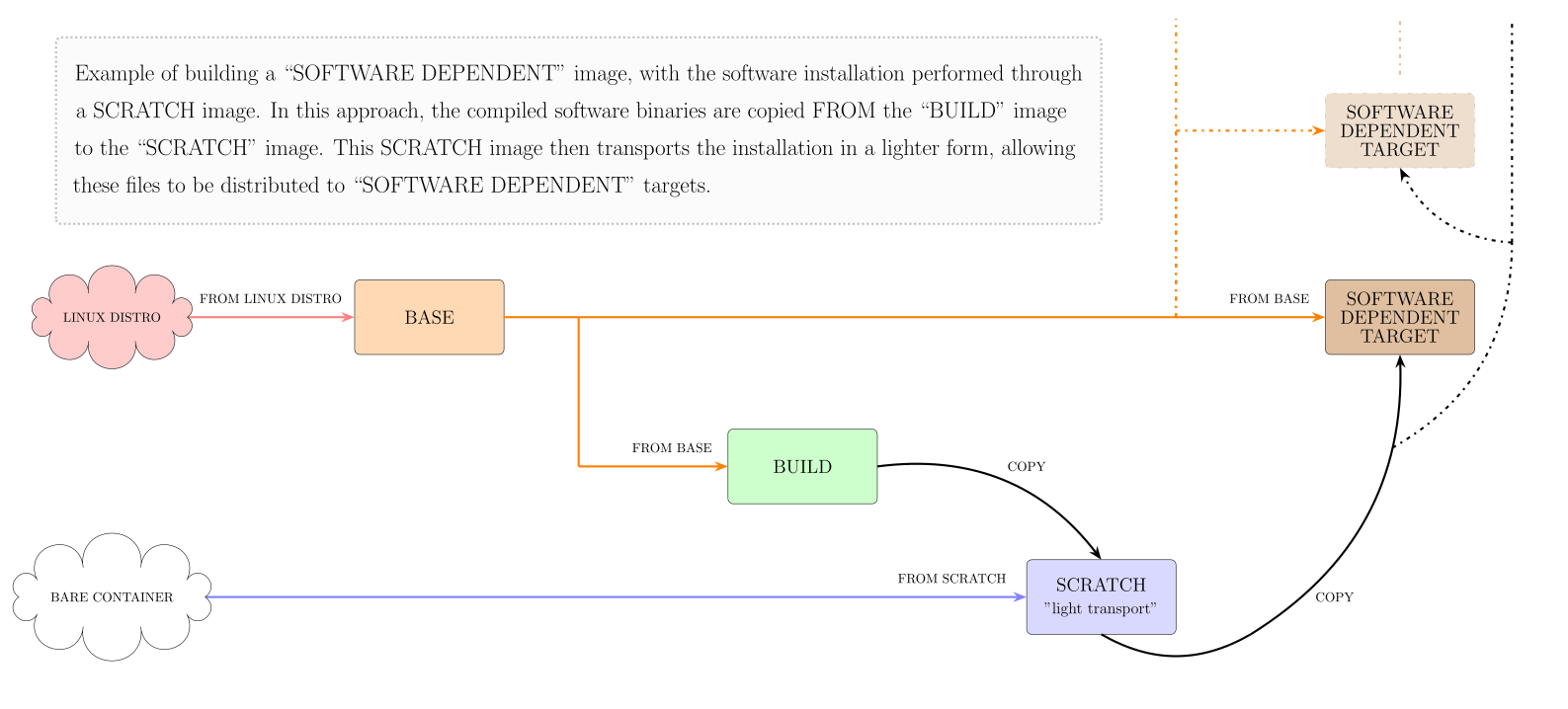
The idea is to use an intermediate scratch container to “transport” the compiled binaries of the required software. These binaries are then directly copied into the final container using the COPY command in directories like /usr/ or /usr/local/, achieving the installation of the software.
Practical Example (Scratch)
Imagine we need GHDL in multiple stages. A possible solution is to design a container file with four different types of stages:
- One to perform the base image.
- One to build GHDL (FROM base).
- Using a custom directory for the installation, such as
/opt/ghdl/.
- Using a custom directory for the installation, such as
- One to temporarily store and distribute the installation (compiled binaries) of GHDL (FROM scratch).
- One/others where GHDL is needed (FROM base and COPY compiled GHDL from scratch).
A simplified version of this container file could look like the following:
# Author:
#   Unai Sainz-Estebanez
# Email:
#  <unai.sainze@ehu.eus>
#
# Licensed under the GNU General Public License v3.0;
# You may not use this file except in compliance with the License.
# You may obtain a copy of the License at
#
#     https://www.gnu.org/licenses/gpl-3.0.html

# GHDL container

MAINTAINER <unike267@gmail.com>

FROM ubuntu:latest AS base

ARG GNAT_VER="13"
ARG LLVM_VER="18"

# Install dependencies
RUN apt-get update -qq \
 && DEBIAN_FRONTEND=noninteractive apt-get -y install --no-install-recommends \
    ca-certificates \
    clang-$LLVM_VER \
    gcc \
    gnat-$GNAT_VER \
    llvm-$LLVM_VER-dev \
    make \
    zlib1g-dev \
 && apt-get autoclean && apt-get clean && apt-get -y autoremove \
 && update-ca-certificates \
 && rm -rf /var/lib/apt/lists/*

FROM base AS build

ARG LLVM_VER="18"

# Install ghdl
RUN apt-get update -qq \
 && DEBIAN_FRONTEND=noninteractive apt-get -y install --no-install-recommends \
    git \
 && git clone https://github.com/ghdl/ghdl \
 && cd ghdl \
 && mkdir build-llvm \
 && cd build-llvm \
 && CXX=clang++-$LLVM_VER ../configure --with-llvm-config=llvm-config-$LLVM_VER --default-pic --disable-werror \
 && make -j$(nproc) \
 && make DESTDIR=/opt/ghdl/ install \
 && cd ../.. \
 && rm -rf ghdl

# Temporary scratch image for “transporting” the compiled GHDL binaries
FROM scratch AS tmp_ghdl
COPY --from=build /opt/ghdl/ /ghdl/

# Final ghdl dependent target
FROM base AS ghdl_dependent_target
COPY --from=tmp_ghdl /ghdl/usr/local /usr/local/

RUN ghdl --version
By running:
podman build -f ghdl.containerfile -t ghdl:from-scratch --target ghdl_dependent_target
When building the target ghdl_dependent_target all the steps required to generate each COPY are executed concatenated.
In this case, in the final image, the dependencies related to the BUILD step are saved.
In addition to this, the binary files generated after the GHDL compilation are lightly transported via a FROM SCRATCH image. The following image summarizes this concept:
Notes
- Usually the base image is made from a linux distribution.
- It should be noted that there are images of linux distributions that are explicitly built lighter, such as
Alpine.
- It should be noted that there are images of linux distributions that are explicitly built lighter, such as
- Standalone repos: If the repository is standalone, you could directly use
wgetto download a.tar.gz file. However, in this case,wgetshould also be pruned from the final image using this concept. - Unlike the
COPYcommand, which leaves the file it copies in the image, theMOUNTcommand uses that file but does not leave it in the final image.- In addition to this, the
MOUNTcommand has other cool options such as allowing a mount over ssh.
- In addition to this, the
- In Linux, the directory
/opt/is typically used to install optional or add-on software packages. - I’ve used a Python virtual environment (venv) for installation via pip instead of using
--break-system-packagesbecause, in my opinion, this approach provides a cleaner installation.- With the
VIRTUAL_ENVenvironment variable, it’s not necessary to activate the virtual environment explicitly. This is because/venv/binis added to the image’s$PATHvariable, ensuring that all containers built from this image will inherit the updated$PATH.
- With the
- The pyhton
.whlpackage is analogous to a.debpackage in a Debian environment. - A tool for exploring each layer in a image: gh:wagoodman/dive
Inspired by the teachings of @umarcor.