[toc]
Collection of various bash commands.
- Kill/stop all process with particular port
kill $(ps aux | grep 8888 | awk '{print $2}') - Kill/stop all processes star were started by the VS Code via Remote-SSH:
ps -ef | grep ".vscode-server" | awk '{print $2}' | xargs kill
-
Show linenumners in
nanonano -l <file>
-
Determine number of cores + CPUs
lscpu | grep -E '^Thread|^Core|^Socket|^CPU\('echo "Cores = $(( $(lscpu | awk '/^Socket\(s\)/{ print $2 }') * $(lscpu | awk '/^Core\(s\) per socket/{ print $4 }') ))" -
List directory as tree (required:
apt-get install tree)tree . tree -a . -
Flush disk cache
sync; echo 3 > /proc/sys/vm/drop_caches
-
Shows lines of an output file with grep
grep -n <pattern> <file>
cat -n <file> | grep <pattern>
- To change locale do the following
sudo locale-gen en_US.utf8
sudo update-locale LANG=en_US.utf8
-
Determine the space available on the disks (df)
sudo df -h -
Determine the space available on the disks (du)
- Size on disk (all folders, sorted high -> low)
sudo du -hsc .* * | sort -rh - Size on disk
sudo du -hsc * - Real size of files
sudo du -hbc * - Size of a single folder
sudo du -sh /var - Sort output
sudo du -h | sort -rh
- Size on disk (all folders, sorted high -> low)
-
Information about disks
sudo lsblk -o NAME,FSTYPE,SIZE,MOUNTPOINT,LABEL -
Remove some staff
sudo apt clean # remove cache
- https://askubuntu.com/questions/1224/how-do-i-determine-the-total-size-of-a-directory-folder-from-the-command-line
- https://askubuntu.com/questions/343066/how-to-delete-a-non-working-kernel-after-update
- https://unix.stackexchange.com/questions/218074/how-to-know-number-of-cores-of-a-system-in-linux
- https://unix.stackexchange.com/questions/19480/how-to-display-line-number-while-doing-grep-on-a-file
- https://www.tecmint.com/learn-nano-text-editor-in-linux/
- How to configure alias-es (add the lines to the end of the file)
nano ~/.bashrc - Configure
lsalias ls='ls --time-style=long-iso --color=tty -Altrh'
- Color the grep-match for easy reading.
alias grep='grep -inE --color=auto'
- Show linenumners in
nanoalias nano='nano -l'
- Execute a command without keeping it in history
<your_secret_command>; history -d $((HISTCMD-1)) - Execute a command without keeping it in history (can start your session with)
export HISTFILE=/dev/null ;history -d $(history 1) - Add timestamp to bash commands (check by calling
history)echo 'export HISTTIMEFORMAT="%F %T "' >> ~/.bashrc - Relevant articles
- Execute a command without keeping it in history
- Use
tcpdumputility to monitor desired portssudo tcpdump port 443 and '(tcp-syn|tcp-ack)!=0' - Active TCP connections
netstat -plunt - Display all active Internet connections
netstat -natp - Find out processes that uses paricular port
netstat -nlp | grep ':80'
- Install
sudo apt install zsh - Make default
chsh -s $(which zsh) - Check if worked
$SHELL --version - Install and use ohmyzsh
- Relevant articles
- zsh + NumLock Issue
- Check option:
Terminal -> Features -> Disable application keypad mode - Check option:
Terminal > Keyboard > Initial state of numeric pad > Normal - Materials
- Check option:
Fix issues with keys by editing nano ~/.zshrc
text bindkey "^[[H" beginning-of-line bindkey "^[[F" end-of-line
- Install
sudo apt-add-repository ppa:fish-shell/release-3 sudo apt-get update && sudo apt-get upgrade sudo apt-get install fish - Make default (own user)
chsh -s /usr/bin/fish - Make default (root)
sudo chsh -s /usr/bin/fish - Modify
$PATHfor fishfish_add_path /usr/local/bin - Add alias into fish
alias ls='ls --time-style=long-iso --color=tty -Altrh' funcsave ls - Issue with colors in Putty
set -U fish_color_command cyan set -U fish_color_error red --bold set -U fish_color_valid_path yellow --bold set -U fish_color_option brmagenta --bold set -U fish_color_param magenta --bold - Materials
- https://fishshell.com/docs/3.0/tutorial.html#:~:text=Switching%20to%20fish%3F,usr%2Flocal%2Fbin%2Ffish
- https://dev.to/iqium/install-fish-shell-on-ubuntu-2204-3337
- https://fishshell.com/docs/current/tutorial.html#tut_startup
- https://fishshell.com/docs/current/interactive.html#syntax-highlighting-variables
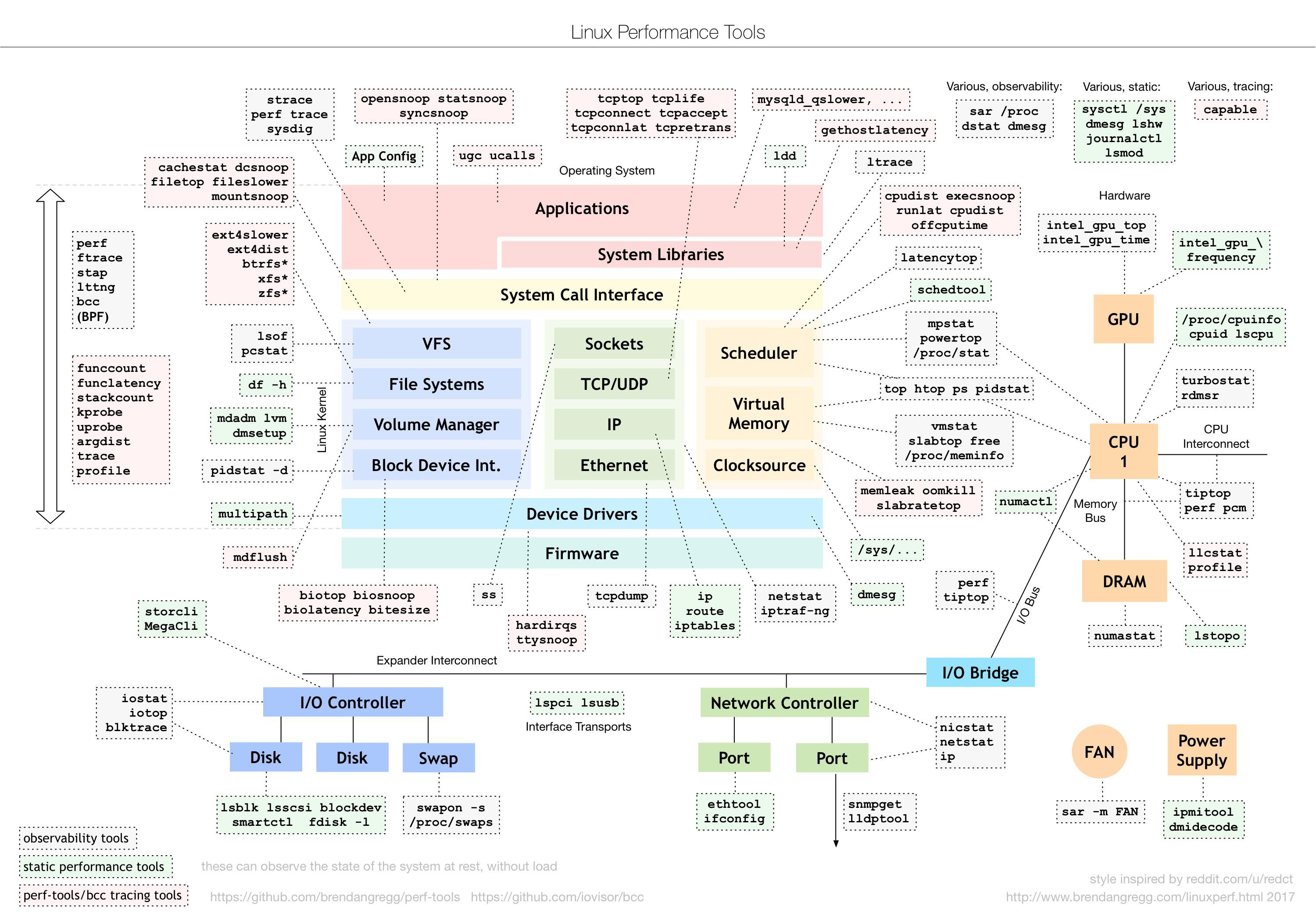
- Cheat sheet on Linux Performance
batorbatcat- syntax highlighting for a large number of programming and markup languagesapt install bat- https://github.com/sharkdp/bat
exa-> ls alternative- have to be compiled on Ubuntu
- https://github.com/ogham/exa