
Warning
This project is discontinued. Starting from July, 31st, 2025, Disblock website will be closed, and the Discord bot will stop working.
To learn more about this, please check this announcement.
Thanks to everyone who used Disblock ! ❤️
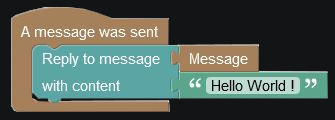
Disblock is a totally customizable Discord Bot. You can create your own actions with blocks, and the bot will execute your created code in Discord !
You can define exactly what the Bot must do, without needing any developement knowledges !
- Homepage
- Documentation Work in progress
- Discord server
- Trello
Actually, we only support installation with docker, but we're planning to add standalone soon.
A more precise guide to install Disblock is planned and will be available soon !
One of the fastest and easiest way to have the bot running. Install Docker and Docker-Compose and download files
git clone https://github.com/Disblock/Disblock-WebApp
cd Disblock-WebApp
cp "env_files/example.env" ".env"
cp "docker-compose/docker-compose.yml" "docker-compose.yml"
Configure .env file and docker-compose.yml if needed
Then, start everything :
docker-compose up
If you have an error that looks like repository does not exist or may require 'docker login', you may need to create the required images. You can run the following commands :
docker build . -t disblock
cd ..
git clone https://github.com/Disblock/BotApp
cd BotApp
docker build . -t disbot
cd ../Disblock-WebApp
Once you built disblock(web application) and disbot(Discord bot), you can try to run docker-compose up again !
If you encounter any issues while trying to install and run Disblock, feel free to open an issue here or join the support server !
Create a certs folder and move it your certificate and key
mkdir certs
mv path_to_cerificate_key certs/key.pem
mv path_to_certificate certs/cert.pem